Sunday, 1 May 2011

Task #17 - Delicious

A year or so our librarian at school put us onto delicious when, due to a rebuilding of the network, most of use lost our 'favourites'.  Since then I have been an avid user, and find the ability to store relevant websites in a central location which I can access from anywhere extremely convenient. 


At school we also use delicious as part of inquiry approach to learning and through our College Resource Centre website students are able to access relevant websites to their unit of study.  These lists are compiled in collaboration between our Resource Centre and teaching staff are a godsend in providing students with a springboard from which to undertake their research.

The downside I have found with delicious is its repeated 'changing of hands'.  Over the Christmas break, delicious was taken over by Yahoo and when I tried to access my account was prompted to create a new Yahoo account.  With already too many accounts to keep track of, I emailed their help desk and was able to acquire a back-door entry to avoid having to sign up with Yahoo.  Then, without warning it happened again.  As recent as last long weekend, I saved a number of websites to my delicious account only to then find on Wednesday when I tried to access the site that they had been taken over by the boys from YouTube.  This time there was no back door option and I had to give permission for my bookmarks to be moved across to, what I can only assume, is their operating system, in order to access them.  Granted the transition was seamless but two changes in four months doesn't exactly fill me with confidence, so I might have to begin investigating what other sites are out there.  Marjie's, of 'Seeking and Finding' blogging fame, suggestion of 'diigo' is intriguing and could provide the solution I am looking for!

Tuesday, 26 April 2011

Task #15 & #16 - RSS Feeds and Subscribing to them

Confession!  It wasn't until creating my iGoogle page, as part of Task #8 that I really even thought about what RSS feeds were.  Sure, I had heard people talk about them and seen the little RSS feed logo at the top of my window browser and on various pages that I had visited but I really didn't have much of an idea about what the fuss was all about.  After watching the links that Dione provided I know have a better understanding of how the whole thing works. 

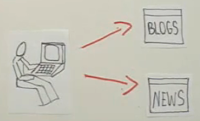
My very basic understanding is (thanks to the CommonCraft video on YouTube) that by subscribing to RSS feeds you are, in effect, getting information to come to you, rather than you having to go out to individual websites to keep yourself updated on topics of interest.

             
                Without RSS Feeds
With RSS Reeds

To make organising all your RSS feeds easier to organise and view, you need to have a RSS Reader (a home) such as Google Reader.


Having set up Google Reader I then embarked on Task #16 to sign up for some of these RSS feeds and encountered yet another Pandora's box! I knew that RSS feeds were available for most of the news organisations but I just didn't realise that there were feeds for just about anything you could think of.  Everything from the weather to jewellery!  I even came across a website that provides a directory of free RSS Feeds - Feedzilla!  Personally, I have very keen interest in brain research, especially as it related to young adolescent development and the implications of this for best teaching practise, and was pleased to be able to find (though they are American) some RSS feeds of relevance.  I was also pleasantly surprised with how easy it was to subscribe to these feeds, especially as I didn't have to create an account but was able to sign up with the same Google Account that I created in order to develop this blog.  It is my understanding that some RSS feeds to require you to create a separate account and I must admit that I would be very relucant, unless their content was amazing, to avoid these sites, as, like many of you I am sure, I am quickly accumulating a length list of account logins and passwords- almost too many to keep track of!  I can't begin to tell you how many times I have had to use the "forgot your password" link!

In short, RSS feeds are a much more convenient way to keep up-to-date on topics of interest, rather than trawling endless websites.  The reader sites that are available to collate your RSS feeds are a gem in providing one location from which you can access and organise all your feeds.  I cannot help but wonder though, if I haven't just created yet another thing that I need to check and keep track of.  Access to all this information is wonderful but I can see why people are becoming so PLUGGED IN!  I recently came across this article from the New York Times, when doing some other research, that was written about a year ago that some of you may find interesting regarding this very issue is titled 'Your Brain on Computers - Attached to Technology and Paying a Price'. 

RSS Feeds - yet another great Web 2.0 offering but the jury is still out on how much I will actually use it.  Time will tell I guess!

Saturday, 23 April 2011

Task #13 & #14 - The great Facebook vs MySpace debate!

I know according to the guidelines set down that these are two separate tasks; however, the more I have read, the more I have looked at them both, the more I have discussed the pros and cons with others, the more I realise that the ongoing social networking battle for users sees Facebook and MySpace does and will (most like given recent trends) always see these to sites interconnected.  After all, we like nothing better than to compare don't we!?!  Myer versus David Jones, Coles versus Woolies, Coke versus Pepsi, paper versus plastic, public versus private, the red shoes or the blue...or both!?!  We are all driven by the need to get the best value for our money so why shouldn't the battle for our time be any different!

Before I continue I think it only right that I confess that I am not, nor do I have any immediate intention of becoming and MySpace or Facebook user.  If I have learnt anything on this Web 2.0 journey it is that I am very easily distracted - MySpace and/or Facebook would clearly only be another vehicle by which I could see myself whiling away the hours and continuing to avoid my mounting piles of marking.

Back to the task at hand!

Over the last two weeks, while I have contemplating this task, I have been amazed with just how often these two organisation find themselves in the news, both good and bad. 
Most recently, the fact that Facebook's user numbers have surpassed 500 million making it the third largest nation in the world, was a particular eye opener for me.  I had no idea that so many people where interacting socially online through this kind of medium.  Don't get me wrong, I knew it was popular but I didn't know 1 in 13 of us worldwide had a Facebook account, 10,059,980 of which of us are Australians (nearly half our population) and that 6.6 million of us check our account DAILY! 
So what surprised, and secretly alarmed me, was the sheer size of this thing.  I investigated further and found a site called socialbakers.com who look at the statistics associated with Facebook use.  If, like me, you prefer colour graphs to pages of statistics, this site is well worth a look.  Colourful graphs aside, this still wasn't helping me with what makes a person choose on site over another.  So the investigation continued.

Next I came across a website that claimed to explain the difference between Facebook, MySpace...and Twitter!  From here I learnt that:

  • Facebook conversation are like dinner conversations, connecting people who already know one another and interacting accordingly.
  • Twitter conversation are like cocktail party conversations, enabling you to connect with people you find interesting but don't necessarily know.
  • MySpace conversations are like High School Cafeteria conversations, connecting people with similar tastes with whom you may nor may not have a real-worth relationship (aesthetic similarities)
For those of you who may have checked out the link, you will see it is to a Facebook based page.  In the interest of presenting a balanced blog entry, I looked further to see if I could find a MySpace supporter who could explain the difference from their point of view - thanks to Bonnie's Blog I found the following:
  • Facebook is an elaborate chat room.
  • MySpace is an elaborate entertainment centre.
Clear as mud!?!  Then I stumbled across this and it became clearer why the popularity of Facebook has taken off in recent years. In my opinion, it all seems to comes down to what is easiest to use with the technology that is now available.
Perhaps the most eye-opening of my findings, was as a result of discussions held with my current class and a number of former students who are now in Year 11. 

Regardless of what I might think about social networking sites, the truth is that they have quickly become an integral part of the life of the adolescent.  Currently I am teaching the sixth grade and when polling my students of their use of social networking sites I was surprised to learn that of a class of 26, 18 of my students have Facebook pages, even though that are between the ages of 10-12.  My discussions with some of my former students were even more of an awakening.  In their words Facebook has replaced the mobile phone as their primary source of communication with their peers.  One when even so far as to state that not to be on Facebook makes you an social outcast as all social get-togethers, both formal and informal, are organised through Facebook.  No Facebook = No Social Life! 

Three years ago I held an administrative role that saw my duties include the behaviour management and disciplining of Year 7 and 8 students.  At that time, MSN, email and mobile phone messaging were the greatest technology issues that I was forced to deal with, how quickly times change!  So where does that leave my initial disclaimer...clearly the power of this thing cannot be easily dismissed.

As educators this is a new world,
ignore its implications at your peril!


Wednesday, 6 April 2011

Task #12 Flickr

fish-tree Einstein quote by G.Chris Clark

I have come across Flickr numerous times in my web search but this is the first time that I have taken the time to set up an account and really explore what it has to offer.  I haven't uploaded any pictures of my own as yet as the only ones I could find all had people in them.  This is clearly one of those sites that I could see myself easily losing myself in - I am constantly amazed by how talented and creative people can be given the opportunity to express themselves.  Flickr is clearly a platform through which the 'artist' is us all can express themselves to a world-wide audience. 

I can see some myself using some of these amazing photos in the classroom as stimulus for both class discussion and demand-writing activities.  Not to mention the possibilities for personal contemplation, creative springboards for art, debate...the list could go on! 

Nice to find myself inspired by the creative genius of others again!

Like Flickr, I had encountered Fotolia, Slide and Dumpr (a somewhat unfortunate yet catchy name) but have not gone into the finer point of their offerings.  I guess just another couple of additions to my growing 'Future Explorations' list!  If there is a downside of this course I guess that is it.  The more you find out about Web 2.0 offerings, the more you realise just how much is out there.  Ignorance sure was BLISS and certainly less time consuming!  Just as well I am enjoying myself! 

Or, as is quickly becoming a tradition within my blog entries, as my good friend Albert would say...

"Intellectual growth should commence at birth and cease only at death."

Task #11 LibraryThing

Have just accessed the LibraryThing web site, created an account and have a bit of a look around.  Personally this isn't a service that I can see a great deal of use for in my daily life, though having a historian for a mother I can see a great deal of value in this site in her line of work.

I have also taken the opportunity to have a look at the Yarra Plenty website as recommended in Dione's email this week.  The visual format of profiling books and including a range of recommended texts, as well as the "comment" capability for users is probably more user friendly for the age group that I teach.  I realise that the Library Thing website is similar; however, for a primary student, navigation is a little more complicated and they have to some idea of what they are looking for.  The Yarra Plenty format, is more like the experience they have browsing the books on the shelf - definitely more visual!  I also love the fact that they can create their own 'book shelf' to keep track of the names of titles that they may wish to consider in the future, it is very in tune with the often random way in which young teens often approach reading - "You know that book I was looking at last week with the skateboard and the guy with the hat on".  A much easier way to help them find the titles that so often as so abstract in their description!
In short, from my stand point - the LibraryThing is definitely set up for the serious adult reader, where as the Yarra Plenty Regional Library Website has great visual appeal and is very user friendly for both a younger age group and those in need of inspiration and guidance in developing their love of reading!  After all it is a tough market place out there for the old book and it needs all the help it can get, especially if you are an eleven or twelve year old, the target age group of the students I teach! 

Friday, 1 April 2011

Task #10 - Image Generators

I got my name in lights with notcelebrity.co.uk

http://www.batmancomic.info/ 
After Task #9, I have to say I have really enjoyed Task #10 for no other reason than I can see the practically implications of how I can use some of these great image generator now inside my classroom.

Having read Dione's teaser about having 'received a soda can apology', I began my investigations with says-it.com.  After a shaky start with the site experiencing a large amount of traffic, hence preventing my images from being generated I finally was able to create an LP.  I liked that you were able to edit the text and colours within this site but was a little disappointed that the background image did not have a transparent capability.  Nonetheless, I can see me kids loving this site and using it with both their wiki pages and Glogster poster creations in the coming term.

Likewise my students will love a number of the links contained within the generatorblog.blogspot.com, the only downside of this site is that there are a number of sites that are unsuitable for primary age students so some time needs to be spent identifying those that will be appropriate given the age group and set tasks.  In my usual fashion, I have already found myself exploring many of these sites and as you would expect, some are better than others.  Will have to investigate
http://www.glassgiant.com/
 the availability of many of these addresses through our network as well, as I have no doubt many would currently be unavailable for students to access.

Given the nature of our work in technology next term with Internet safety, I can see the value of the avatar creations sites but was a little disappointed that doopleme.com/ requires joining to access a number of the avatar decorative features.  I did, however, quite like the lego character creator.  And yes, that is my efforts at the bottom of this page to create my own avatar - scary how similar we look!

Perhaps the link that I can see the most benefit from inside the classroom is makebeliefscomix.com.  This site has great potential, especially as an English and revision tool. I also think our Spanish teacher will be very excited to learn of its possibilities is his subject area as well.

In short, I have been amazed by how many Image Generators there are in Web 2.0 Land.  I can see their benefits as both a novelty and an application tool within the classroom and look forward to continuing to explore what is out there - though perhaps it will have to wait for another day given that it is already the early hours of Friday morning!

Thursday, 31 March 2011

Task #9 - Virtual Worlds

Time for a confession!  This is an aspect of Web 2.0 that I have serious doubts about and as a result, I was reluctant to being this week's tasks.  Doing my best to put my preconceptions aside, I embarked on my SecondLife orientation.  I learnt how to go forward and back, about interactive objects, chatting with other avatars, creating my own avatar look, and all the different 'worlds' I could choose to be apart of - but I still find myself pondering the question, "What is wrong with interacting with real people is the real world?"  Given the number of people who access these alternative realities, I extended my search to try and find out what the attraction is.  This is what I have learnt:

According to Joe Sanchez - "Virtual worlds are connecting people in a disconnected society".  Question - can these connections be considered real?

In the words of Dan Brown - "We are in the midst of a very real revolution.  If institutional education refuses to adapt to the landscape of the informational age, it will die, and it should die!...Information has been liberated...Any educational institution based solely on providing students with facts is not preparing students for the real world."  A very impassioned speech from a Gen Y student, disillusioned with the education system yet presenting a number of very valid points and an informative insight into the views of today's university students.

Apparently, according to Marc Prensky, I am a 'digital immigrant' who is teaching 'digital natives'.  Like all immigrants while I can and do adapt to my environment, to some degree I will always retain the 'accent' of my past experiences with and without technology.  This makes some sense.  Perhaps I can be honest enough as to say, perhaps this is at the source of my 'questioning' nature when it comes to technology and its implications for the classroom.

Yet I also learnt that these alternative worlds can provide the opportunity for students to:
  • Role play in any number of situations and time periods including Ancient Rome, Shakespeare's plays (SecondLife) or even using virtual world technologies to assist pre-graduate teachers to improve their professional decision making skills (Matthew Campbell - School of Education, Australian Catholic University).
  • Undertake scavenger hunts to locate and collate information about a given topic
  • Take guided tours of sites otherwise unavailable to students to explore such as the Cysteine Chapel or inside a Dell Computer (SecondLife)
  • Participate in simulations which enable them to view different perspectives, walk in someone else's shoes.
  • Create professional networks through which they can collaborate, co-create and share information
  • Participate in tutorials and lecturers, even complete the content of a course at their own pace
  • Interact with people from around the world, the language translator contained with SecondLife a definite plus in this regard
All amazing things, agreed, but definitely limited by the 18+ user policy.  Was appalled to learn of the seeder and downright disturbing side of SecondLife. Granted their is a TeenWorld, however, adult input into this site is forbidden with the expectation of SecondLife employees.  This led to me to wonder what might be available to a younger crowd, that also had the same 'educational' possibilities.  I was surprised to find a number of site do exist and even grants in Victoria of up to $2000 for teacher to participate in some of these virtual world simulations (Quest Atlantis) with their students.  I even found a project in Queensland - The Games in Learning Project (2008).  It did, however, contain the following disclaimer:

"Education Queensland and the games in Learning Project are not recommending that
Virtual Worlds be used in the classroom or with students at this point in time. 
We are currently conducting a full audit on virtual worlds and their potential for learning
and will provide advice to schools once this is completed."
 
Needless to say, I could find no further 'advice'.
So where does that leave me, given that I started with my digital immigrant accented view of the whole 'virtual world' thing?  STAY TUNED...the jury is still out for this Primary School Teacher!
And then there was ExitReality!  The Vimeo video link with the creators of ExitReality (great to see it is an Australian initiative) certainly was interesting but I think they explained its appeal best in describing their intended demographic as "social network users who like to decorate their space."  Granted it looks good and its ability to interface with MySpace is great but...the honest truth...who has the time to "pimp out their pages".  Great appeal perhaps to the digital native but I for one am still coming to terms with the impact of technology on my workload.
No don't get me wrong, I am a techno-convert and consider myself to be quite an assimilated immigrant but the reality of working in this changing educational environment (caught somewhere between between the institutionalised 'chalk and talk' environments of the past and the potential freedom and limitless learning opportunities of the future) is that more and more is being bolted on, nothing is being removed or replaced.  The result of which is an environment in which educators such as myself are excited by the potential of the technology but who often feel overwhelmed by the reality of making it work, not to mention the time and effort it takes to learn and acquire these new skills whilst keeping on top of the endless piles of traditional marking, profiling and accountability as dictated to us by 'those above'. 

 
The answer? 

 
Time? 


I'm open to the thoughts and ideas of others - preferably before I drown!!